


Kraken: Buy Crypto & Stocks
4.38.39K Reviews
App Specs
- Version
- 3.78.0
- Updated On
- License
- Free
- Downloads
- 5,000,000+
- Developer
- Payward, Inc.
- Categories
- Finance
- Platform
- Android, iOS
Screenshots
 Analysis by AppCompare
In a shared household, a finance app can be useful without becoming a shared account. I’d treat Kraken as a personal place to review and manage investments, not as a family dashboard. That distinction matters: one person can show another how they follow markets, but each user should keep their own login and decisions. Clear account boundaries make everyday use safer and reduce the chance of mixing up whose money or trades are involved.
A practical place in a household routine
Imagine checking your investments while planning the week’s budget. You can open the app, review what you hold, and keep an eye on assets you are considering without making a purchase on the spot. That separation between watching and acting is useful: a market move can catch your attention, but it doesn’t have to dictate an immediate decision. I find it sensible to decide in advance what you want to learn or check before opening any finance app, especially if you tend to react quickly to price changes.
For a couple or housemates coordinating shared expenses, Kraken is not a substitute for a budgeting tool or a joint account. Its role is closer to an individual investing app. If household money is involved, agree on responsibilities and keep investment funds distinct from bills and shared savings. This is not a special feature of the app; it is a practical boundary that helps prevent misunderstandings.
Set up your own account, not a shared login
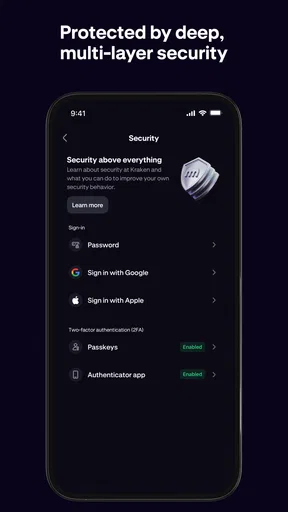
When more than one person uses the same phone or tablet, signing out and protecting access deserves attention. A finance account can expose sensitive information, so I would avoid saving credentials where another household member can casually open them. Use a device lock and account security options that you understand, and don’t hand over your password as a shortcut for showing someone a chart. A quick screen demonstration is better than letting another person browse while signed in.
It also helps to agree on what “helping” means. A partner can sit beside you while you explore an unfamiliar screen, but the account holder should make the final choice and enter any required credentials privately. That approach is especially helpful for people who are new to investing and may want a second pair of eyes without giving up control of their account.
Coordinating decisions without sharing access
If you and someone close to you follow the same assets, you can compare notes outside the app: discuss why an item is on a watchlist, what would make you reconsider, or whether a purchase fits your own plan. A watchlist is useful for this kind of patient research because it lets you observe an asset before taking action. I’d use it to prepare questions and track interest, not as a signal that a purchase is automatically wise.
One small but valuable habit is to separate research time from transaction time. Check what has changed, note what you want to investigate, and return later if you still have a clear reason to act. This is particularly useful when several people in a household are talking about a market move: conversation can generate ideas, but it should not turn into pressure to buy. Each person has different goals, tolerance for losses, and financial circumstances.
Worth Reading Before You Choose

Flipboard Shows What News Apps Must Do Beyond the Feed

Switching to Android Auto Means Rethinking Your Driving Routine

Google Calendar Makes a Crowded Week Easier to Manage

Ludo King Makes the Most of the Minutes Between Plans

Baby Panda World Brings Quick Play to Modern Phones, but Its Game Library Feels Busy

ESPN’s Live Game View Makes Following Close Games Easier
Age, trust, and sensible expectations
The app is rated for Everyone, but that content rating is not a recommendation for children to trade or manage investments. I would keep the account under the adult owner’s control and explain the difference between learning about markets and putting money at risk. A child can ask questions while an adult reviews a chart, but that does not make the account a shared learning space with built-in family supervision.
Trust also means being realistic about what a mobile interface can do. A polished screen and security tools can make account access feel straightforward, but they cannot remove investment risk or guarantee a result. If you are helping a relative, be careful not to present your own choices as instructions. For someone who needs detailed guidance before placing trades, a dedicated educational resource or a conversation with a qualified professional may be a better first step.
As a finance app from Payward, Inc., Kraken: Buy Stocks & Crypto is free to install, with in-app purchases listed from $4.99 to $49.99 per item. It has an average rating of 4.5 from around 49,000 ratings, and has been installed over 5 million times. Those figures suggest that it has reached a substantial audience, but they are not a measure of whether it suits your household or investing style.
Who will find it useful—and who may prefer another option
I can see this working well for someone who wants a single mobile destination for following crypto and stocks, values being able to check holdings on the go, and is comfortable learning the basics as they go. It can also suit a cautious beginner who wants to watch assets and build familiarity before making a decision. The useful question is not simply whether the app has many tools, but whether having investments and market information together helps you stay organized rather than encouraging constant checking.
If you mainly want to buy and hold a small number of assets, a simpler brokerage app may feel calmer. If your priority is a detailed household budget, use a budgeting app alongside your investment account rather than expecting Kraken to track shared bills. And if you want a highly guided, hands-off experience, an app designed around managed portfolios may fit better than a platform where you choose what to follow and when to act.
Compared with opening separate apps for stocks and crypto, keeping both interests in one place can reduce switching and make it easier to review your overall activity. The trade-off is that a combined view may put more market information within reach than you need. I’d use notifications and app-checking habits thoughtfully, and avoid turning every spare moment into a market check. Convenience is valuable only when it supports a plan you already understand.
Using Kraken as an individual investor
If you're anything like me, navigating the world of cryptocurrency and stocks can feel like you're entering a labyrinth. But fear not, because Kraken: Buy Stocks & Crypto is here to guide you through the maze. I've spent some quality time with this app, and I'm excited to share my experiences with you.
Getting Started with Kraken
The first thing you'll notice when you fire up the app is its sleek interface. Seriously, it's like the creators took a look at the chaos of some other financial apps and said, "Nah, we've got this." Signing up is a breeze—just the usual email verification and setting up 2FA for that extra layer of security we all need these days.
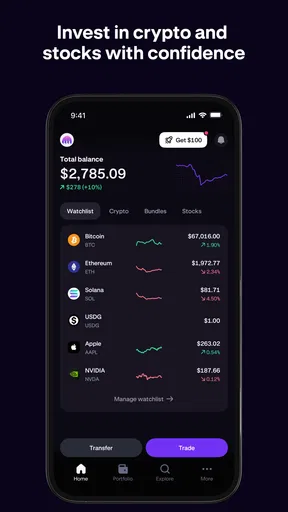
Once you're in, the dashboard is your new best friend. It's clean, intuitive, and gives you a quick snapshot of all your assets. Whether you're a newbie or a seasoned trader, this app makes it easy to see where you stand.
Navigating the Features
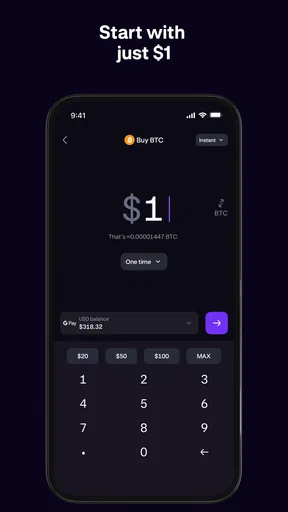
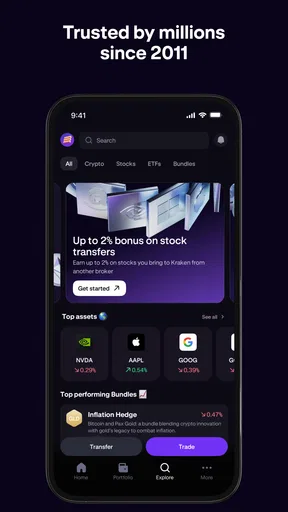
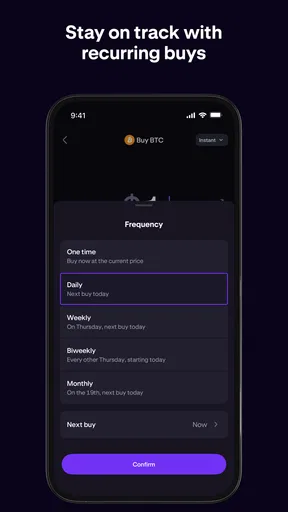
Now, let's dive into what you can actually do with this app. Buying and selling is as straightforward as ordering a pizza, just way more financially rewarding. The app supports a wide range of cryptocurrencies and stocks, so you won't feel limited in your investment choices.
One feature I absolutely love is the "Watchlist." It allows you to track specific assets without diving into the deep end right away. It's like window shopping, but with the potential to make money. You'll also find detailed charts that let you analyze market trends. Trust me, you'll start feeling like a Wall Street pro in no time.
Security and Peace of Mind
Security is a big deal when it comes to financial apps, and Kraken doesn't skimp in this department. They offer top-notch encryption and robust security protocols. Plus, there's always the option to set up biometric login if you're as paranoid as I am about passwords.
For those concerned about their money being safe, Kraken is as legit as they come. They're fully regulated and have a solid reputation in the financial world. It's like having an armored vault right in your pocket.
The Community and Support
One of the coolest aspects of Kraken is its community. They have a thriving forum where you can connect with other users, share tips, or just vent about the market's ups and downs. It's like having a support group for your financial journey.
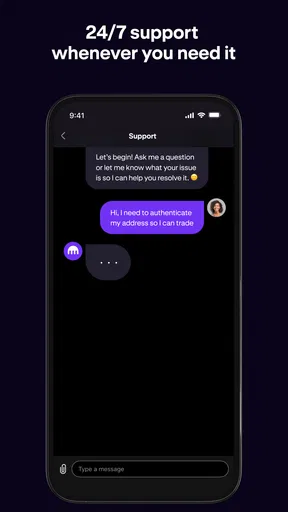
And if you ever hit a snag, their customer support is top-notch. I had a minor hiccup during registration, and their team was on it faster than you can say "blockchain." It's reassuring to know someone's got your back when you're dealing with your hard-earned cash.
Wrapping Up the Kraken Experience
All in all, Kraken is a powerhouse of an app. It's user-friendly, secure, and offers a comprehensive suite of features that cater to both novices and veterans in the trading world. Whether you're looking to dip your toes into the crypto scene or expand your stock portfolio, Kraken has got you covered.
So, if you're ready to take your financial game to the next level, give Kraken a whirl. Who knows? You might just find yourself enjoying the labyrinth of stocks and crypto. Happy trading!
Pros
- User-friendly interface for beginners.
- Wide variety of cryptocurrencies available.
- Strong security features implemented.
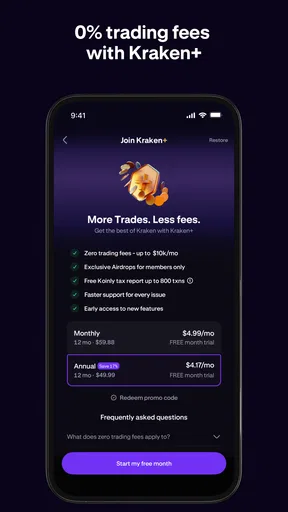
- Low trading fees compared to competitors.
- 24/7 customer support available.
Cons
- Limited stock trading options.
- Occasional app glitches reported.
- Complex verification process.
- No phone support available.
- Advanced features can be overwhelming.
FAQs for Kraken: Buy Crypto & Stocks
What is Kraken: Buy Stocks & Crypto?
Kraken: Buy Stocks & Crypto is a mobile application that allows users to buy, sell, and manage both stocks and cryptocurrencies. It offers a user-friendly interface for tracking investments, accessing market data, and executing trades. The app is designed to accommodate both beginners and experienced investors, ensuring a seamless trading experience.
Is Kraken: Buy Stocks & Crypto safe to use?
Yes, Kraken: Buy Stocks & Crypto is known for its robust security measures. The app employs advanced encryption protocols and two-factor authentication to protect user data and funds. Additionally, it is regulated and compliant with financial regulations, providing users with a secure platform for trading stocks and cryptocurrencies.
What fees are associated with using Kraken: Buy Stocks & Crypto?
Kraken: Buy Stocks & Crypto charges competitive fees for transactions, which vary depending on the type of trade and the volume being traded. Users can expect fees for buying, selling, and withdrawing funds. It's important to review the fee schedule within the app to understand the costs associated with specific transactions.
Can I trade all cryptocurrencies on Kraken: Buy Stocks & Crypto?
While Kraken supports a wide range of cryptocurrencies, not all digital assets are available for trading on the platform. The app includes popular cryptocurrencies like Bitcoin, Ethereum, and Litecoin, among others. Users should check the app for the most updated list of supported cryptocurrencies to ensure their desired assets are available.
Does Kraken: Buy Stocks & Crypto offer customer support?
Yes, Kraken: Buy Stocks & Crypto offers robust customer support to assist users with any questions or issues. Support is available through multiple channels, including in-app chat, email, and a comprehensive help center. Users can access resources and contact support directly from the app to resolve any concerns efficiently.


